Blog Privacy
How to remove tracking parameters from links on Android
Tracking parameters follow you across the web and leak who you are when you share a link. Here is what they are, why they matter for privacy, and how to strip them automatically on Android.
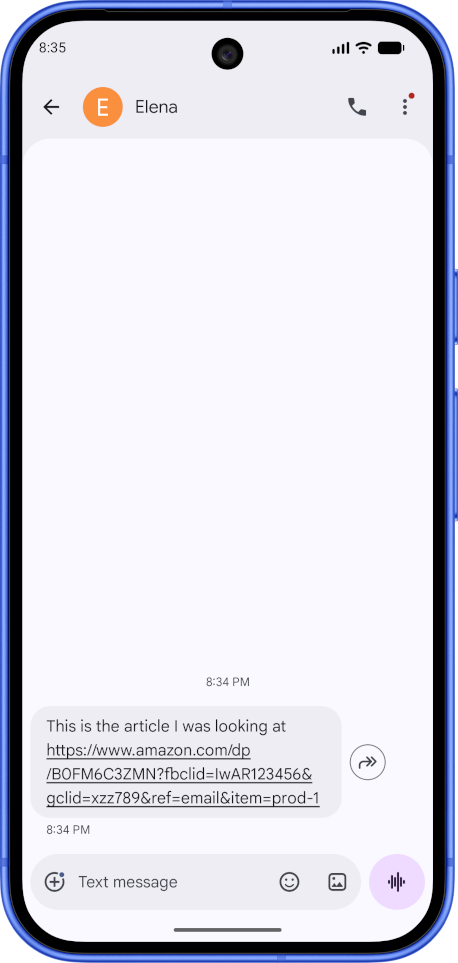
You tap a link in a chat, a newsletter, or a social feed. By the time the page opens, the address bar is full of things you never typed, some of the most common ones: utm_source, fbclid, gclid, a long string of random characters. Most of that is not there to help you reach the page. It is there to record that you reached it.
This post is about those extra pieces, called tracking parameters, and how to get rid of them on Android. We will start with what they are and why they matter for your privacy, then walk through the manual ways to remove them and the simpler option of doing it automatically.
What tracking parameters actually are
A web address has a useful part and, often, an attached part. The useful part is the domain and the path: it tells your browser which page to load. The attached part comes after a ? and is made of key=value pairs separated by &. Some of those pairs are genuinely needed by the page. Many are not.
The ones that are not are usually there to identify you or the source you came from. A few you will see constantly:
- UTM tags (
utm_source,utm_medium,utm_campaign, and friends). These tell a website’s analytics where a visitor came from. They are added by marketers, not by you. fbclid. The Facebook click identifier. It ties your visit back to your activity on Facebook and Instagram.gclidanddclid. Google’s click identifiers, used for ad attribution.igshid,si,ref, and similar. Per-platform identifiers from Instagram, YouTube, and others that can encode which account or post sent you.
None of these change the article, product, or video you are trying to reach. Strip them out and the page loads exactly the same. That is the key thing to understand: in the large majority of cases, the tracking part of a link is dead weight you can safely remove.
Why this matters for your privacy
It is easy to shrug 🤷🏻at a few extra characters in a URL. Here is why it matters!
They link your activity across sites. A click identifier is a thread. When the same network sees that thread on many different websites, it can stitch your separate visits into one picture of what you read, buy, and care about. You did not agree to that picture, and you usually cannot see it.
They survive in ways cookies do not. Because of regulation a lot of attention goes to cookies, and browsers have gotten stricter about them. URL parameters in the link are a quieter channel. They sit right inside the address, so they keep working even when cookie based tracking is blocked.
They leak when you share. This is another hidden cost to your privacy, and those you would talk with. If a friend sends you a link with an fbclid still attached, that identifier can point back to their account and the post they saw it on. When you forward a messy link, you may be passing along a small fingerprint of where you have been. Sharing a clean link protects both of you.
They follow you off the web too. That same long link gets pasted into messaging apps, saved in notes, and dropped into documents. Cleaning it once, early, stops it from spreading.
You do not have to be doing anything sensitive for this to matter. A link should take you to a page, not quietly report on you while it does.
The manual ways to remove them on Android
It is possible to clean this by hand, but of course that requires specialized knowledge, and it’s a lot of friction, and that’s why most people never bother.
Use a browser extension. On Android few browsers support extensions, Firefox and forks being a rare exception, but for those that do you could install an extension to do this job.
Use a privacy-focused browser. DuckDuckGo and Brave have some level of privacy tracking cleanup at the URL level, which protect their users out of the box.
The simpler option: clean links automatically
AltSea is the Android decision point before the browser takes over. Make it your default app for standard web links and it can handle links from chats, email, and social apps in any browser you choose. It removes known tracking parameters and redirect clutter on your device before the link is opened.
From there, you can open the cleaned link in the browser you prefer, share a clean copy, save it, categorize it, or schedule it for later.
Two things matter here for privacy specifically.
You can see what changed. AltSea does not just silently rewrite the link and hope you trust it. You can inspect the result and understand what was removed, which is the whole point of taking back control rather than handing it to another black box.
It runs on your device. Cleaning a link does not require sending it off to some server first. The work happens locally, so you are not adding another middleman between you and the page you wanted to visit.
That pause keeps the privacy benefit in your hands: every link you tap arrives cleaner, with less of you attached to it before you decide where it goes.
Clean links before they open
AltSea removes known tracking parameters and redirect clutter on your device before a link opens, then lets you choose what happens next.

Frequently asked questions
Are tracking parameters in a URL dangerous?
They are not malware, but they are a privacy concern. Parameters like utm_source, fbclid, and gclid let advertising and analytics networks connect your visits across sites and link your activity back to a profile. When you share a link that still has them attached, you can also reveal which post or account you came from.
Does removing tracking parameters break the link?
Almost never. Tracking parameters are for analytics and attribution, not for loading the page, so removing them normally leaves the destination unchanged. A small number of links use query parameters to load specific content, such as a product variant or search query, and AltSea leaves those alone. If you ever find a link that does not work after cleaning, report it directly in the app and we will fix it.
How is this different from private or incognito browsing?
Private browsing stops your browser from saving history and cookies on your device. It does not remove the identifiers from the link itself, so the destination site can still read them. Cleaning the link removes those identifiers before the page ever loads.
Can I clean a link before I share it?
Yes. You can share a link into AltSea, let it strip the tracking parameters, then copy or share the cleaned version. The people you send it to get a tidy link, and you are not passing along an identifier that points back to you.